Haplo

Annot8

Annot8 on a Mac: a photo of bananas and oranges with a box around every one, and the fruit set down the sidebar with ticks on the photos already done

Bounding-box image annotation for Mac

Draw a labelled box around every object in a folder of images, then take the whole set out as one CSV, ready for training.

Step 1 of 4

Draw a box, name it, move on

Drag a box around the fruit, type its class or click one you have used, and Command-N brings up the next photo. The four boxes on this plate:

  1. apple699 × 721 px
  2. apple672 × 718 px
  3. orange794 × 781 px
  4. banana1912 × 911 px

Step 2 of 4

See how far through the set you are

7 of 7 photos done
34 boxes drawn

Every photo you move on from gets a tick in the sidebar, and a blue ring marks the one you are on, so a long set never loses its place.

Step 3 of 4

Keep classes consistent

Name a class once and it turns into a button, with its own colour on every photo. Apple is spelled the same way on the first image and the last.

  • apple 18
  • orange 10
  • banana 6

Step 4 of 4

Take the lot out as a CSV

The share button saves annotations.csv: a row per image, with every box’s label and its x, y, width and height in pixels.

annotations.csv7 rows
Filename,Label 1,CGRect 1,Label 2,CGRect 2,Label 3,CGRect 3,Label 4,CGRect 4,Label 5,CGRect 5,Label 6,CGRect 6,Label 7,CGRect 7,Label 8,CGRect 8,Label 9,CGRect 9,Label 10,CGRect 10,
"plate-apples-orange-banana.jpg","apple","837.8, 179.5, 699.0, 720.8","apple","1740.8, 68.0, 671.8, 718.1","orange","1335.5, 862.2, 794.2, 780.6","banana","750.7, 1357.3, 1912.2, 911.2",,,,,,,
"table-bananas-oranges.jpg","orange","408.6, 723.6, 1200.4, 1332.3","orange","3486.2, 404.4, 1140.8, 1132.3","orange","3665.0, 1553.7, 1225.9, 1183.4","orange","800.3, 2213.5, 1242.9, 1196.1","banana","1600.5, 178.8, 766.2, 2409.3","banana","1826.1, 25.5, 1034.4, 2703.0","banana","2434.8, 0.0, 936.5, 2788.1","banana","3009.5, 366.1, 821.5, 2890.3","banana","2519.9, 2656.2, 638.5, 578.9",,
"bowl-oranges-limes-apple.jpg","orange","29.9, 603.7, 736.0, 672.0","orange","765.9, 712.5, 507.7, 364.8","orange","535.5, 1297.1, 605.9, 631.5","apple","1124.3, 1254.4, 691.2, 689.1",,,,,,,
"book-three-apples.jpg","apple","1975.3, 1413.8, 1037.8, 1102.9","apple","0.0, 2727.3, 1238.3, 1163.1","apple","1183.1, 3830.2, 1539.1, 1664.4",,,,,,,,
"empty-produce-baskets.jpg",,,,,,,,,,,
"apples-pears-lemons.jpg","apple","777.5, 489.3, 1211.9, 1125.0","apple","3827.9, 214.9, 1202.8, 1120.5","apple","1980.3, 1436.0, 1184.5, 1143.3","apple","4010.8, 2332.4, 1175.3, 1225.7",,,,,,,
"nuts-apples-oranges.jpg","orange","248.1, 24.8, 138.9, 129.9","orange","177.8, 112.5, 124.9, 129.4","apple","134.4, 255.9, 117.0, 117.6","apple","228.9, 215.4, 94.5, 97.9","apple","299.8, 146.8, 99.6, 95.1","apple","397.1, 126.0, 91.1, 78.2","apple","324.6, 222.8, 89.4, 81.0","apple","412.3, 193.5, 90.0, 75.4","apple","271.7, 279.6, 114.2, 104.6","apple","379.1, 249.8, 120.4, 110.8",

The set’s 34 boxes in Annot8’s CSV layout, measured on the photos. Turn it into YOLO labels with our guide

Photos from Wikimedia Commons: Happy fruits by Tristan Schmurr (CC BY 2.0); A group of ripe bananas sits next to several oranges by Shixart1985 (CC BY 2.0); Fruits in bowl: oranges, lime, apples by Gerardolagunes (CC0); Three apples, red and green, rest near an open book on a wooden table by Shixart1985 (CC BY 2.0); Empty pint-sized molded pulp produce baskets by Kayaker (CC BY-SA 4.0); Fresh fruits arranged on a wooden surface by Shixart1985 (CC BY 2.0); Nuts, apples and oranges by Zeynel Cebeci (CC BY-SA 4.0). Resized, with our boxes drawn on them; the CC BY-SA photos are shared under the same licence.

Boxes drawn at hotkey speed

Annotation is a numbers game: the tool should never be the slow part. Draw, name, next.

Draw a box, label it, move on

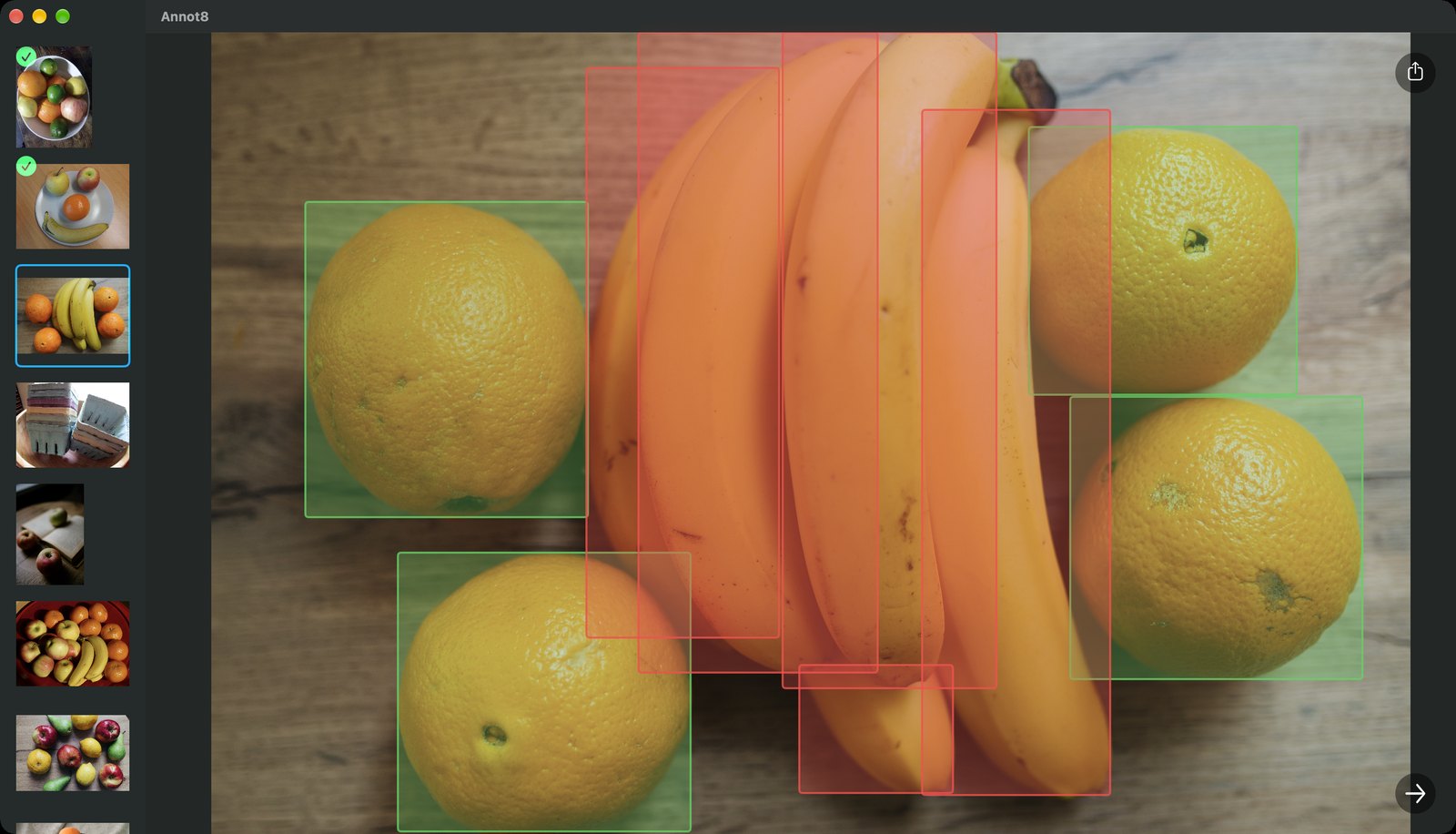
Drag a box, pick its label, then Command-N takes you to the next image. The loop stays under your hands. Here, the nine boxes on our bananas-and-oranges photo.

The tool is not the bottleneck

Command-N or the right arrow moves through the set and the canvas stays put. Return saves a label, and nothing waits on a web app to catch up with your hands.

Consistent labels

A class you have typed once comes back as a one-click button, in the same colour on every image, so it never drifts between photos.

Know what is left

The sidebar ticks off every image you have been through, so you always know how far into a set you are.

Out as a CSV

One row per image, with every box’s label and coordinates, ready to reshape into whatever your training pipeline expects. Our guide turns it into YOLO.

Your dataset stays on your Mac

No upload, no seat licence, no per-image pricing. Useful when the images are medical, proprietary, or simply not yours to put on someone’s server.

  • Nothing uploaded
  • Works with no connection
  • No account required

Cheaper than an afternoon

One payment, against annotation platforms that bill by the month or the seat. Label as many sets as you like on your Mac.

Box your first set tonight.

$1.99 once, for Mac. Open a folder, draw your boxes and save the CSV. No account, and no subscription.

Annot8

Image annotation for Mac

  • Mac, macOS 14 or later
  • $1.99 once
  • No account required
Download on the App Store

App information

Version1.1
Updated2025-07-25
Size1MB
CompatibilityMac
Price$1.99 once