


Haplo

ShipHappens

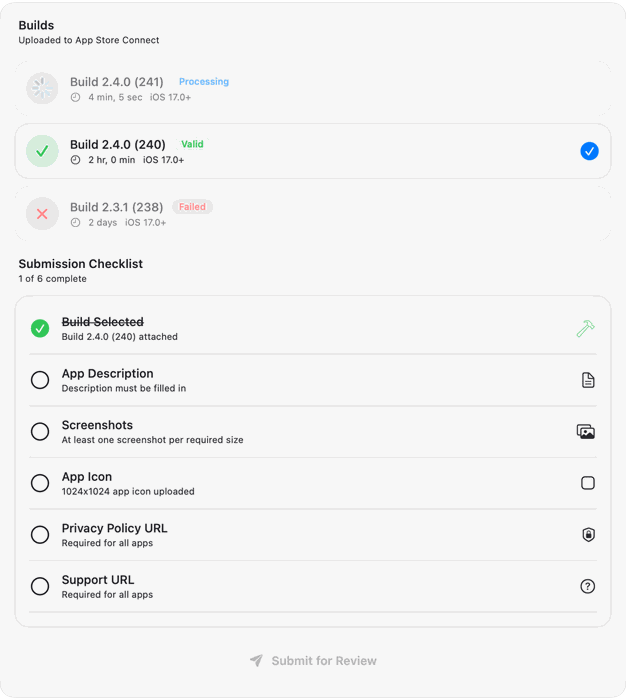
ShipHappens on the Mac: builds uploaded to App Store Connect, and the submission checklist for the next release

App Store screenshots, localization and uploads, for Mac

Screenshots, localization, keywords and the upload to App Store Connect, in one Mac app. Ship the release in half an hour, then watch the downloads land.

ShipHappens on Product Hunt, a top post of the day

Step 1 of 5 · Launch day

Day one: 0 downloads

The app is live, but the listing is in English only, the screenshots are plain and the keywords are guesses. Nobody finds it yet.

0 downloads on day one

A sample launch, for illustration. The chart behind follows it for 42 days.
Step 2 of 5 · Day 8, localization

Localize into six locales in one upload

Pick the locales. The listing and the screenshot captions are translated in one pass, by the AI model you choose or one that runs on your Mac, and every locale uploads together.

  • English (U.S.)Adaptive plans that fit your week
  • GermanPläne für deine Woche
  • Japaneseあなたの1週間に合うプラン
  • French (France)Plans adaptés à votre semaine
  • Spanish (Spain)Planes hechos para tu semana
  • Portuguese (Brazil)Planos que cabem na sua semana
1,193 downloads by day 17, sample

Which languages to localize first

Step 3 of 5 · Day 18, keywords

Climb the keywords that bring installs

Track where you rank for each search, see Apple's search popularity once Apple Ads is connected, and check the keyword field for length, repeats and plurals before you apply it.

  1. marathon training planfrom 100+4
  2. 5k trainingfrom 100+7
  3. running coachfrom 8912
  4. half marathonfrom 3821
  5. run trackerfrom 7258
  6. pace calculatornot in the top 100 yet100+
5,101 downloads by day 27, sample

Sample ranks, in the app's own table. How the keyword field works

Step 4 of 5 · Day 28, screenshots

Screenshots without a designer

Drag device frames, headlines and backgrounds onto one canvas and export a whole display type in one go. The captions translate with the rest of the listing, so every locale gets its own set.

  • iPhone
  • iPad
  • Mac
  • 6 locales
11,007 downloads by day 35, sample

Every screenshot size Apple accepts

Step 5 of 5 · Day 36, the update

Ship it, then watch it land

Screenshots, metadata and every locale go to App Store Connect through Apple's API: no zip files, no browser tabs. Then downloads are tracked against the day you shipped.

  • Screenshots
  • Metadata
  • 6 locales
18,402 downloads by day 42, sample

A sample launch, for illustration: every download number in this story is made up to show the flow, not a forecast. We built ShipHappens to ship our own apps: 8 Haplo apps shipped with it. The submission checklist · Why apps get rejected

The release chore, in half an hour

Screenshots, localization and upload in one Mac app: the ritual before every App Store release, done in one pass.

Lay out store screenshots without a designer

Drag device frames, headlines and backgrounds on a canvas, then export a whole display type in one go. No Figma round trip, no export checklist.

Ship in every locale you listed

Metadata is translated and pushed with the build, through a hosted model by default or a local one if you would rather nothing left the Mac, so adding a language stops being a reason to put the release off.

Straight into Connect

Signed API upload of screenshots, metadata and locales. No zip files, no browser tabs.

16× faster than by hand

Measured against doing the same release manually, screenshot by screenshot.

Climb the terms that matter

Keyword fields scored against what people actually search, before you spend a release on them.

Every app in one place

Built for the developer shipping nine apps, not one. Switch between them without re-authenticating or rebuilding a template.

Watch the release land

Downloads and impressions tracked against the day you shipped, so you find out whether the new screenshots were worth the afternoon.

What people say

Unedited, from the App Store.

“Downloaded to see if I could speed up my localization process and was blown away. I highly recommend to all iOS developers.”

Itravel2much

Ship the next one in half an hour.

$19.99 a month or $59.99 a year, or $79.99 once and keep it. Screenshots, localization, keywords and the upload, in one Mac app.

ShipHappens

App Store releases on Mac

  • Mac
  • $19.99/mo or $79.99 once
  • Your own App Store Connect key
Download on the App Store

App information

Version3.2
Updated2026-10-23
Size45MB
CompatibilityMac
Price$19.99/mo or $79.99 once