Haplo

Barrier

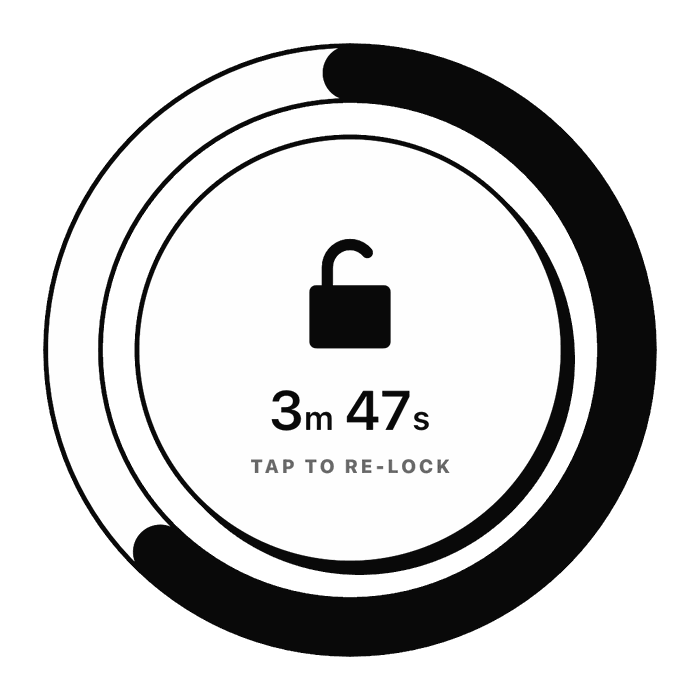
Barrier's unlock screen: a ring timer reading 3 minutes 47 seconds, with the words Tap to re-lock underneath

App blocker for iPhone, built on Screen Time

Get your time back from the feed. Barrier locks the apps you can’t put down, opens them for a few minutes when you really need one, then locks them again by itself.

4.7 · 346 App Store ratings

Product Hunt: Barrier, #1 Product of the Day

Step 1 of 4

Lock the apps you can’t put down

Choose apps, whole categories or websites in Apple’s own picker. Barrier keeps them shut around the clock or on your schedule, and a blocked app opens to Barrier’s screen instead of the feed.

  • TikTok
  • Instagram
  • YouTube
  • X
  • Snapchat
  • Reddit
  • Facebook

7 of 7 locked

It runs on Apple’s Screen Time API, so the block is the system’s own. Every way to block apps on iPhone, compared
Step 2 of 4

Watch the daily average fall

2h 40m Daily average, week 4

Lock the feeds, and the Social bars in your Screen Time report are the ones that shrink, week after week.

  1. Week 1, before Barrier5h 12mup 4%
  2. Week 24h 7mdown 21%
  3. Week 33h 21mdown 19%
  4. Week 42h 40mdown 20%

Example weeks, for illustration. How much is too much? What the research says, and every Screen Time setting, explained.

Step 3 of 4

Earn a few minutes, then it locks itself

10m 00s until it locks again

Tap the lock in Barrier and wait out 30 seconds, or after your first four unlocks, watch a short ad. Your apps open for the time you set, 10 minutes to start, with the countdown on your Lock Screen.

At zero, everything locks again by itself, even with Barrier closed. Done early? Tap the ring to re-lock.

A block that actually holds

Built on Apple’s own Screen Time API, so a blocked app is genuinely blocked, not a reminder you can swipe past.

The apps you can’t put down, locked

Barrier holds distracting apps shut. Unlock when you genuinely need to, and everything locks itself again on its own.

Hours back, not nagging

The point is not a guilt notification at 11pm. It is the time that quietly stops disappearing into the feed, and a Screen Time report that shows it.

Turns itself on

Work hours, sleep, or a block you define, overnight ones included. It arms without you remembering to.

A reason to keep going

Days under your daily goal build a streak worth not breaking.

Counting down in plain sight

Borrowed minutes tick away in a Live Activity on the Lock Screen, so you always know what you spent.

You choose exactly what to restrict

Pick apps one by one, whole categories or websites in Apple’s own picker. Nothing is blocked that you did not ask to be blocked.

Free, and honest about why

There is nothing to buy and no paid tier on the blocking. Barrier pays for itself with a short video ad when you unlock, after your first four.

What people say

Unedited, from the App Store.

“Gives me time to think twice and not mindlessly scroll my life away.”

Gen1509, CA

“It’s incredibly helpful when it comes to reducing our daily screentime”

Kal481ggzz, GB

“You should always put ads but only for 30 sec. We have to wait anyway!”

Flood4, CA

“Simple app to stop me from scrolling through social media, does its job!”

bluejeans115

“Cut my screen time in half and it was so much better than the last one I had”

Med7198

“this is helping me to stop scrolling calm down, and study,also do more activities!🫶”

Elundelang, CA

Lock the first app tonight.

Free, with no subscription and no account to make. Built on Apple’s Screen Time API, so a blocked app is genuinely blocked.

Barrier

Screen Time blocking that holds

4.7 346 App Store ratings

  • iPhone
  • Free, ad-supported
  • Built on Screen Time
Download on the App Store