
 Cinder
 Bilbo
Bilbo Haplo AI
 Barrier
 ShipHappens
 Haplo AI Investing
 Markdown2PDF
 EasyLogo
 Annot8
App Store Localization: Which Languages to Start With
Apple's own storefront table decides where each language appears and where its keywords count. Here's how we'd pick the first languages for an app, what to translate, and the mistakes to check for.

Localizing an App Store page looks like a translation job. Most of it is a decision about where your page will appear. The App Store runs in 175 countries and regions and accepts listing text in 50 languages, and each language reaches a different set of storefronts. Japanese reaches one. Spanish (Mexico) reaches 19, including the United States. French reaches 32.
This guide covers how App Store localization decides which version of your page people see, which languages to localize first, what to translate, and the mistakes worth checking for. Every rule comes from Apple’s documentation as of September 2026. We make ShipHappens, the Mac app we use to translate and upload the listings for our nine apps, so the examples come from pages we actually ship.
How App Store localization works
Every app has a primary language, which Apple’s App information reference defines as the default for your product page “when you don’t provide localized metadata for a given country or region.” Every other language is a localization on top.
Apple’s page on localizing app information explains what one adds. With English alone, your page appears in English in every storefront. Add French, and the French version shows to people whose device language is French, and in storefronts where the App Store supports French but not English. Then the sentence that should drive your choice: “Users can search for your app using localized keywords in all countries or regions where the App Store supports French.” If no localization matches someone’s language setting, Apple uses the next most relevant one; everywhere else, people see your primary language.
Two details catch people out. These are listing languages, not app languages: Apple says they’re metadata, which “differs from adding languages to your app in Xcode.” And a new language starts as a copy of your primary language’s screenshots and fields, except the description and keywords, which you write from scratch. A language you add and never translate just repeats your English name, subtitle and screenshots.
Where each language appears: Apple’s storefront table
The part most localization advice skips is Apple’s App Store localizations table. For each of the 175 storefronts, it lists a default language and any additional supported languages: that’s what “where the App Store supports French” means in practice. Apple adds that what a given customer sees also depends on their device settings, the languages you’ve added and your primary language. We counted the table:
| Localization | Default language in | Also supported in | Storefronts |
|---|---|---|---|
| English (U.K.) | 135, including the UK, India, Singapore, Saudi Arabia and the UAE | 37, including Germany, France, Brazil and Mexico | 172 |
| Spanish (Mexico) | 16 in Latin America, including Mexico, Argentina, Colombia and Chile | United States, Uruguay, Belize | 19 |
| French | France, Cameroon, Côte d’Ivoire, Gabon | 28, including the United States, Belgium, Switzerland, Morocco and Senegal | 32 |
| Arabic | none | 17, including Saudi Arabia, the UAE, Egypt and the United States | 17 |
| German | Germany, Austria, Switzerland | Luxembourg | 4 |
| Chinese (Traditional) | Taiwan, Hong Kong, Macau | United States | 4 |
| Chinese (Simplified) | China mainland | Singapore, United States | 3 |
| Portuguese (Brazil) | Brazil | United States | 2 |
| Korean | Republic of Korea | United States | 2 |
| Japanese | Japan | none | 1 |
What stands out:
- English (U.K.) is the App Store’s default English. It’s the default in 135 of 175 storefronts and missing from only three: the US and Canada, which have their own English, and Japan, whose second language is English (U.S.).
- The US storefront supports ten languages. Besides English (U.S.): Arabic, Chinese (Simplified), Chinese (Traditional), French, Korean, Portuguese (Brazil), Russian, Spanish (Mexico) and Vietnamese. By Apple’s rule, keywords in any of them are searchable in the US.
- Regional versions are separate languages. Spain lists Spanish (Spain), not Spanish (Mexico); Portugal lists Portuguese (Portugal); Canada lists French (Canada). Taiwan, Hong Kong and Macau list no Simplified Chinese. Apple’s rule doesn’t promise your Mexican Spanish keywords a place in Spain.
- Many languages reach one storefront, as its second language. Danish, Finnish, Norwegian, Polish, Hebrew, Thai, Indonesian and Malay each appear once, and English (U.K.) is the default in all eight storefronts. Add them when those markets matter to you, not in a first wave.
The list keeps growing. On 31 March 2026, Apple added 11 languages, bringing the total to 50 and aimed “especially” at India, whose storefront now lists 11 Indian languages, Hindi included, alongside its default English (U.K.).
Which languages to localize first
Apple’s guide to expanding your app to new markets starts with your own data. Three questions settle most of the decision.
1. Where are people already finding you?
Apple suggests looking at “Product Page Views, App Units, Sales, and Active Devices, filtered by territory” in App Store Connect. Its own example: if your app is in English and retention in Germany is below average, consider German. We look for storefronts with plenty of product page views and a conversion rate below our average. People there find the page and don’t act on it, and a page in their language is the cheapest fix to try.
2. How far does the language reach?
That’s the table above. One Spanish (Mexico) localization is the default in 16 storefronts and also reaches Spanish speakers in the US. Japanese covers exactly one storefront.
3. How much do people there need it?
Apple notes that “some markets may have greater proficiency with your app’s primary language, while others may require more significant localization work.” The EF English Proficiency Index 2025, built from the test results of 2.2 million adults in 123 countries and regions, gives a rough measure. It ranks the Netherlands 1st and Germany 4th, then Spain 36th, France 38th, South Korea 48th, Italy 59th, Brazil 75th, China 86th, Japan 96th and Mexico 103rd.
Proficiency isn’t the whole story. In a 2020 survey of 8,709 consumers in 29 countries, CSA Research found that 76% prefer to buy products with information in their own language, and 40% never buy from websites in other languages. Germany, near the top of the English rankings, had the largest share buying only on local-language sites: 57%. That’s online shopping in general, not the App Store, so treat it as a direction rather than a forecast.
The first wave we’d pick
If your primary language is English (U.S.), add the other English localizations first. They cost almost nothing, and English (U.K.) is the default in 135 storefronts that otherwise show your American text. The British listing of our trip planner, Bilbo, says “Organiser” and leads its keywords with “holiday” instead of “vacation”.
Then, for an English app with no territory data yet, we’d translate in this order:
- Spanish (Mexico), then Spanish (Spain). The widest reach after English: 19 storefronts including the US, led by Mexico, 103rd of 123 for English. Spain needs its own version.
- German. The default in Germany, Austria and Switzerland, and the strongest local-language preference in CSA’s survey.
- Japanese. One storefront, where English proficiency ranks 96th.
- French, then French (Canada). The default in four storefronts, France among them, and a second language in 28 more, including the US. Canada needs French (Canada).
- Portuguese (Brazil). Brazil and the US. Portugal needs Portuguese (Portugal).
- Chinese (Simplified) and Chinese (Traditional). Two scripts for two sets of storefronts. China mainland is Simplified Chinese’s only default storefront, and Apple’s App information reference says some apps need an Internet Content Provider (ICP) Filing Number to be available there, and the metadata in your Simplified Chinese localization has to match what you filed. Games need a separate approval number. Check before you count on it.
- Korean, Italian and Russian, then wherever your own data points.
It’s close to where our apps settled. Eight of our nine share a core of German, Japanese, and both versions of Spanish, French, Portuguese and Chinese. Barrier, our screen-time app, stops there with its four English localizations, at 14 in all; six others have between 25 and 28.
What to translate in each localization
Apple’s limits for the localizable fields, as of September 2026, from its platform version and app information references, its product page guide and its list of localizable properties:
| Field | Apple’s limit | Worth knowing |
|---|---|---|
| App name | 2 to 30 characters | Changing it later needs a new version |
| Subtitle | 30 characters | Appears under the name throughout the App Store |
| Keywords | “up to 100 bytes” | Searchable wherever the App Store supports the language |
| Screenshots | 1 to 10 per display size | Copied from your primary language until you upload new ones |
| App previews | Up to 3 per display size, 30 seconds each | Without one, “the next best available language” plays |
| Description | 4,000 characters | Starts empty in a new localization |
| Promotional text | 170 characters | Editable without a new submission; doesn’t affect search ranking |
| What’s New | 4,000 characters | Required for every version after the first |
| In-app purchase names and descriptions | 35 and 55 characters | Shown on your product page |
| Privacy policy, support and marketing URLs | none | Can point to pages in that language |
If you can only do part of a localization, go in this order. The name, subtitle and keywords decide whether you appear in search. Apple says the first one to three screenshots appear in search results when there’s no app preview, so their captions come next; our guide to App Store screenshot sizes covers which sizes you need. Then the description and promotional text. What’s New becomes a job for every release in every language you’ve added, so count that cost before adding ten at once.
How to translate an App Store listing well
Machine-translate, then have a native speaker read it
Machine translation gives a fast first draft, and that’s how ours start. Apple’s advice on what comes next is blunt: “If using any machine translation to localize content, be sure to have native speakers for any languages test your app or game’s translation and provide feedback.” It also suggests giving translators a glossary of frequently used terms and screenshots showing where the text appears.
Rewrite to fit rather than cut
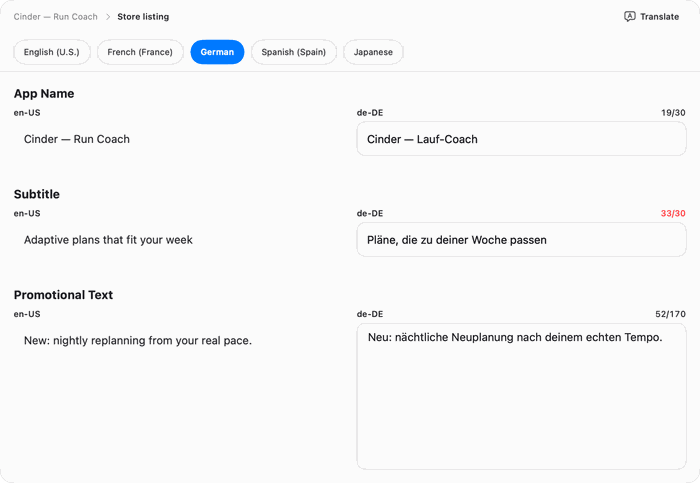
Thirty characters leave no slack. Check every translated name and subtitle against the limit before you upload, and when one runs over, rewrite it shorter. A subtitle cut off mid-word reads as a mistake.
Research keywords in each language instead of translating the list
A keyword list translated word for word wastes space. Machine-translated keyword fields tend to show three problems:
- The wrong sense. Take “holiday” in the British sense of a trip. A machine translation can give Feiertag in German and feriado in Portuguese, which Duden and Priberam define as a day off work for a civil or religious occasion: a public holiday, not a trip.
- Duplicates. “Travel” and “trip” can both become Reise in German and 旅行 in Simplified Chinese, so the list spends characters on one word twice.
- Unused space. Japanese and Chinese words are short, so a translated list can use half its 100 characters or less.
So research each language the way you researched English, starting from the words people there type; our guide to how App Store keywords work covers the method. Apple’s own documents disagree on the unit: App Store Connect Help says “up to 100 bytes”, the product page guide “100 characters total”. We have saved a 58-character Japanese list that is 140 bytes in UTF-8, and App Store Connect accepted it, so whatever it counts, it isn’t UTF-8 bytes.
Treat the two Chinese scripts as two languages
Taiwan, Hong Kong and Macau default to Chinese (Traditional) and don’t list Simplified Chinese at all. Two mistakes are easy to make here: copying the Simplified Chinese text across, and leaving the English name and subtitle that every new language starts with. Both show up only on those storefronts, so they’re easy to miss. Give Traditional Chinese its own pass, and check the page in Taiwan’s store before you move on.
Mirror the layout for Arabic and Hebrew
Arabic and Hebrew read right to left. Apple’s Human Interface Guidelines say to right-align text to match the mirrored layout and never to reverse the digits within a number. On screenshots, that means right-aligned headlines and, if the app is localized too, its mirrored interface.
Check what each storefront shows
The quickest audit is the web version of your page in each country: apps.apple.com/jp/app/id followed by your app’s ID shows Japan’s page, and swapping the country code shows the others. Japan’s page for Bilbo, for example, shows its Japanese name.
App Store localization FAQ
How many languages does the App Store support?
Fifty for listing metadata as of September 2026, across 175 countries and regions. The latest 11 arrived on 31 March 2026.
Does localizing your App Store listing help search?
Apple’s rule is that people can search your localized keywords in every storefront where the App Store supports that language. Apple doesn’t publish how much each localization weighs in ranking, so write each one for the people who’ll read it.
Do I need to translate my app to localize its App Store page?
No, Apple treats the two separately. But guideline 2.3 of the App Review Guidelines asks that your metadata “accurately reflect the app’s core experience”, so if the app is English-only, say so in the description.
What do people see in countries I haven’t localized for?
Your primary language. Delete a localization and Apple says those storefronts “revert to showing the information entered for the primary language.”
When does a new localization go live?
With your next version: Apple says you add localized metadata “with your next version submission.” After approval, new screenshots need a new version. Promotional text is the exception, editable any time.
Can I change my primary language later?
Yes, with conditions. The new one must already have been through App Review in an earlier version, with approved screenshots in the same sizes as your current primary language on every platform you support.
How we made this
We read Apple’s App Store Connect Help, product page guide, localization guide, developer news and App Review Guidelines (last updated 8 June 2026) on 25 September 2026. The storefront counts are our own, from Apple’s table of 175 storefronts, counting spelling variants such as English (US) and English (U.S.) as one language. The locale counts for our nine apps came from App Store Connect through its API that day, and we checked pages in the Japanese and Taiwanese stores on apps.apple.com. The screenshot is from ShipHappens. Proficiency ranks are from each country’s EF EPI 2025 profile; the survey figures are from CSA Research’s press release, as the full report is behind a login. The photo is from Wikimedia Commons.
References
- Apple. App Store localizations. App Store Connect Help.
- Apple. Localize app information. App Store Connect Help.
- Apple. App information. App Store Connect Help.
- Apple. Platform version information. App Store Connect Help.
- Apple. Required, localizable, and editable properties. App Store Connect Help.
- Apple. Upload app previews and screenshots. App Store Connect Help.
- Apple. Creating your product page. Apple Developer.
- Apple. Expanding your app to new markets. Apple Developer.
- Apple. App Store expands support to 11 new languages. Apple Developer News, 31 March 2026.
- Apple. App Review Guidelines. Last updated 8 June 2026.
- Apple. Right to left. Human Interface Guidelines.
- CSA Research. Consumers Prefer their Own Language. Press release, 7 July 2020.
- EF Education First. EF English Proficiency Index 2025.
- Duden. Feiertag.
- Priberam. feriado. Dicionário Priberam da Língua Portuguesa.
Image credits
- Rosetta Stone · Photo: Hans Hillewaert, CC BY-SA 4.0 (Cropped and resized)