
 Cinder
 Bilbo
Bilbo Haplo AI
 Barrier
 ShipHappens
 Haplo AI Investing
 Markdown2PDF
 EasyLogo
 Annot8
SVG vs PNG for Logos
We exported one logo both ways and gave the two files the jobs a logo actually does: printing big, shrinking to a browser tab, sitting on a dark background and loading on a web page. Here's what we measured, and which file to use where.
Export a logo and you’re usually offered two files: a PNG and an SVG. On screen they look the same. Then one of them turns soft on a printed banner, shows up as a white box on a dark website, or gets turned away by an upload form.
We make EasyLogo, a grid-based logo maker that exports both, so we put SVG vs PNG to a practical test. We drew a test logo in it and gave the two files the jobs a logo actually does: printing big, shrinking to a browser tab, sitting on a dark background and loading on a web page. Below is what each format is, what we measured, and which file each platform takes, checked against its own help pages.
The short answer: keep the SVG as your master copy and use it wherever it’s accepted, above all on your website and for anything printed. Use a PNG when you upload a picture into someone else’s system, such as a profile photo or an email signature, and make it at least as big as it will be shown. Use a JPG only when a form insists on one.

What’s the difference between SVG and PNG?
A PNG is a raster image: a fixed grid of pixels, each with its own colour. The W3C’s PNG specification, whose latest edition became a Recommendation in June 2025, describes lossless compression, so nothing is thrown away when the file is saved, and an optional alpha channel for transparency. Our test logo’s PNG is 1,024 × 1,024 pixels: 1,048,576 of them, in 468 different colours. The logo itself uses two colours on white; the other 465 are the in-between shades that smooth its edges.
An SVG is a vector image. The SVG specification defines it as a language based on XML for describing two-dimensional graphics, so the file is text: a list of shapes with coordinates, colours and line widths. Our test logo’s SVG is 1,837 bytes of text. It sets up its drawing area with viewBox="0 0 512 512", lays down a white background square, <rect width="512" height="512" fill="#ffffff"/>, and then draws 10 <line> elements, one for each stroke between two dots of the grid. The sun is the last shape, exactly as it appears in the file:
<circle cx="256" cy="109.71428571428572" r="73.14285714285715" fill="none" stroke="#f59e0b" stroke-width="22.528" stroke-linecap="round"/>
That’s a circle centred at 256, 109.7 with a radius of 73.1, outlined in amber and left unfilled. The numbers are positions on the viewBox’s 512 × 512 grid rather than pixels, so the same instructions can be drawn at 16 pixels or 16,000.
That difference decides everything below. MDN, the web reference run by Mozilla, puts it plainly in its image format guide: SVG is ideal for icons and other images that “can be accurately drawn at any size”, while PNG, being lossless, is “better for screenshots, diagrams, and line art” and is the fallback “for any image needing transparency”.
What happens when you enlarge a PNG logo?
We put both files in a web page at 8,192 pixels wide, eight times the PNG’s size, and took a screenshot of the same spot in each: the top of the mountain.
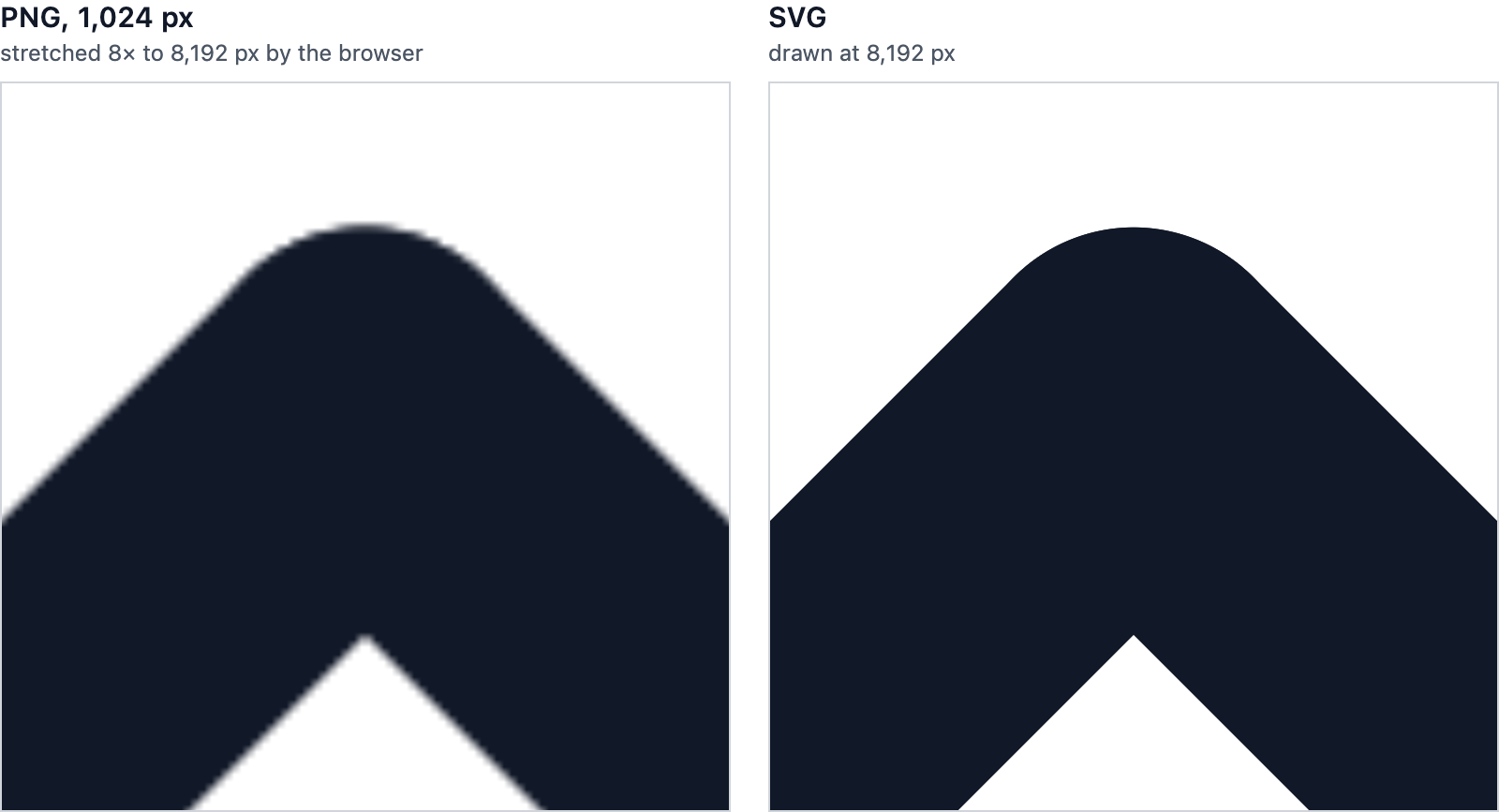
The PNG has no more detail to give. Stretched eight times, each of its pixels has to cover a block of 8 × 8 screen pixels, and the browser blends neighbouring pixels to hide the steps, which is where the soft, slightly lumpy edge comes from. The SVG was drawn afresh at 8,192 pixels from the same coordinates, so its edges are as sharp as at any other size.
Nobody puts a logo that big on a web page, but print needs pixel counts like this. Carleton University’s print shop asks for at least 300 DPI (dots per inch) for anything that isn’t vector, and notes that vector files such as SVG “maintain their clarity regardless of size”. At 300 DPI:
- A 1,024 px PNG prints sharply up to 3.4 inches (8.7 cm) wide. That covers a logo on a business card or a letterhead.
- 8,192 px, the size in the picture above, is 27.3 inches (69 cm): poster size.
- Signs are seen from further away, so they need fewer dots. The same guide gives 35 DPI for something viewed from 5 metres, which means a 2-metre banner needs about 2,760 pixels across. Stretched to 2 metres, our 1,024 px PNG would be 13 DPI.
For print, the SVG is the file to keep. The same shop prefers PDF files for printing, so ask your printer what they accept before you send anything.
Does an SVG look sharper at small sizes?
Not really. A screen is a grid of pixels, so at 32 pixels an SVG becomes 32 × 32 pixels just as a PNG does. We had Chrome draw the SVG at 32 and 16 pixels and shrink the 1,024 px PNG to the same sizes, then enlarged the results with hard edges so you can see every pixel.
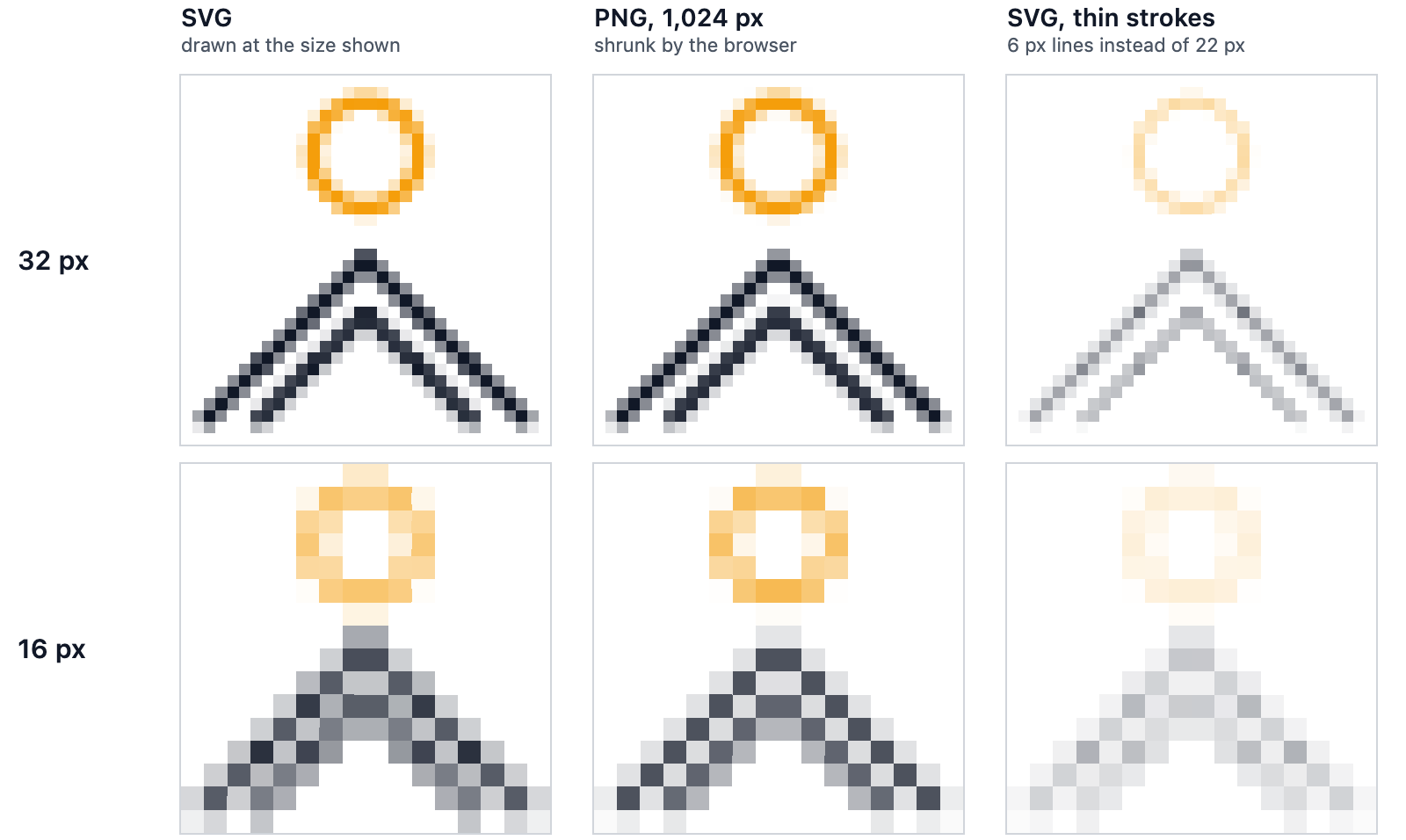
At 32 pixels, the SVG and the shrunk PNG are almost identical, and both read clearly. At 16 pixels, both lose the gap between the two peaks. The version with thin strokes fades to pale grey at 32 pixels and nearly vanishes at 16, whichever format it’s in.
At favicon size, the design matters more than the format. Thick strokes and few parts survive shrinking, and our test logo would hold up better at 16 pixels with one peak instead of two. We cover drawing for small sizes in how to design a minimalist logo, and every size worth exporting in our logo sizes cheat sheet.
Which has a transparent background, SVG or PNG?
Both can. A PNG can carry an alpha channel, a transparency value for every pixel. An SVG is transparent anywhere nothing is drawn. JPG is the one that can’t be transparent: MDN notes that JPEG “has no alpha channel”, so a JPG logo always sits in a rectangle of some colour.
But a format that can be transparent isn’t the same as a file that is. Both of our test files came with a white background built in: the PNG was painted white before the logo was drawn on it, and the SVG’s first shape is the white square quoted above. On a dark background, that’s a white box.
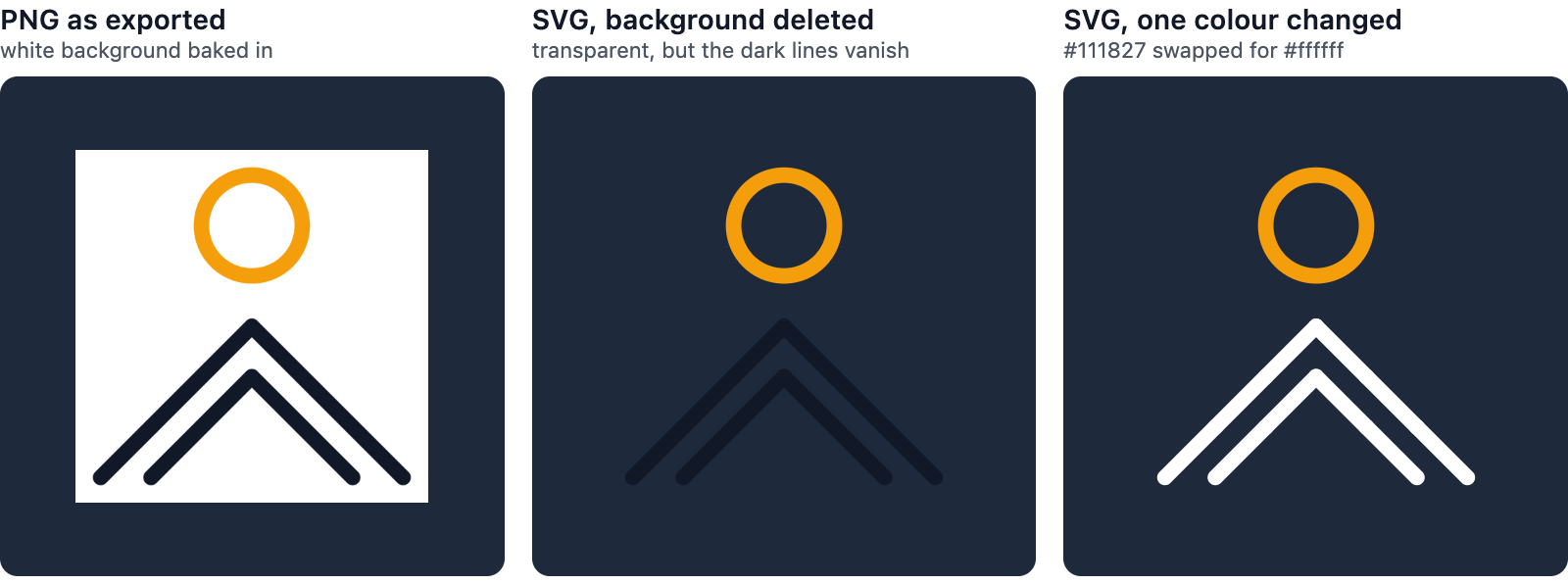
Deleting that one <rect> line made the SVG transparent, and showed the next problem: a near-black logo on a dark background almost disappears. Because an SVG is text, the fix took seconds. Swapping the colour code #111827 for #ffffff with find and replace gave us a light version for dark backgrounds.
Where a transparent logo ends up isn’t always your choice, either. LinkedIn says a Page’s logo is shown on both light and dark backgrounds, and a transparent logo is placed on white. Before you upload a transparent PNG anywhere, look at it on white and on black. If a white square appears around the logo on black, the background is baked in.
Which is smaller, SVG or PNG?
For a simple logo, the SVG, by a long way. These are the sizes of our test logo in each form:
| File | Size in bytes |
|---|---|
| SVG, as exported | 1,837 |
| SVG, compressed with gzip | 351 |
| PNG, 1,024 px, as exported | 63,814 |
| The same PNG, re-saved by an optimiser | 22,712 |
| PNG, 512 px | 11,761 |
| PNG, 256 px | 5,631 |
| PNG, 32 px | 779 |
| JPG, 1,024 px, quality 90 | 51,393 |
Three things stood out.
The PNG straight from the export was heavier than it needed to be. Re-saving exactly the same pixels with an optimiser, and dropping a transparency channel in which every pixel was fully opaque, took it from 63,814 bytes to 22,712. We checked: not one pixel changed. Running an exported PNG through an optimiser before it goes on a website is worth the minute it takes.
SVGs compress well on the way to the browser. Web servers can compress files as they send them. MDN’s guide to HTTP compression says the algorithms are optimised for text, and recommends compressing everything except files that are already compressed, such as images, audio and video. A PNG is already compressed inside the file (the format uses deflate compression). An SVG is plain text: gzip took ours from 1,837 bytes to 351, and the optimised PNG was 65 times that size.
The JPG had nothing going for it. MDN says JPEG is “particularly useful for photographs” and that lossy compression on images that need sharpness “can produce unsatisfactory results”. At quality 90 we could barely see the damage on our logo, but the file was still more than twice the size of the optimised PNG, and it can’t be transparent.
A busier logo changes the SVG’s numbers more than the PNG’s. We also drew a snowflake from 40 line segments:

Its SVG came to 6,026 bytes, 3.3 times the size of the mountain’s, because an SVG grows with every shape it holds. Compressed, it was only 483 bytes, since 40 almost identical <line> tags repeat a lot. Its optimised 1,024 px PNG was 17,169 bytes, and its JPG 98,327, nearly six times the PNG.
At the smallest sizes the balance tips. Our 32 px PNGs were 779 bytes for the mountain and 929 for the snowflake: smaller than either SVG as saved, though not smaller than either one compressed.
Which logo file to use where
| Where the logo goes | File to use | Why |
|---|---|---|
| Your website | SVG | Sharp on any screen at any zoom, and our test logo was 351 bytes compressed |
| Browser tab (favicon) | PNG or ICO, plus an SVG if you like | Google Search’s favicon guidelines list BMP, GIF, ICO, PNG, JPEG, PPM and TIFF, not SVG, and Safari only shows SVG favicons from version 26 |
| Profile pictures | PNG | YouTube takes JPG, GIF, BMP or PNG; LinkedIn takes PNG or JPEG |
| Email signature | PNG | In caniemail.com’s tests, Gmail on the web turns an SVG into a PNG, and Outlook 2016 and older on Windows don’t show SVGs at all |
| Word, PowerPoint, Excel | SVG | Microsoft 365 apps insert and edit SVG files |
| Printers and sign makers | SVG, or a PDF if they ask | Vector stays sharp at any size; anything else needs 300 DPI at the printed size (Carleton’s print shop) |
| A WordPress.com site | PNG | WordPress.com takes SVG only on a paid plan, with a plugin |
| An app icon for Apple devices | SVG or PDF artwork | Apple’s guidelines say to prefer vector graphics for icon layers, on a 1,024 × 1,024 px canvas |
| A US trademark application | JPG | The USPTO takes a stylised or design mark as a JPG of 5 MB or less |
Can you turn a PNG into an SVG?
Going from SVG to PNG is easy: any size you need can be drawn from the SVG, which is how we made the smaller PNGs in the table above. The other way means tracing shapes back out of pixels. A PNG stores colours at grid positions, not the lines and circles they came from, so a traced SVG only approximates the original, and for a clean one you may need to redraw the logo. That’s the strongest case for keeping your SVG: it’s the only copy that still knows what the shapes are.
SVG vs PNG FAQ
Is SVG or PNG better for a logo?
Keep both, and treat the SVG as the original. It scales to any size, stays small and can be edited as text. Make PNGs from it at the sizes you need for the places that only take pictures: profile photos, email signatures and upload forms.
What size should a logo PNG be?
At least as big as it will be displayed, because shrinking looks fine and stretching doesn’t. For uploads, use the platform’s own numbers: YouTube shows a profile picture at 98 × 98 px, and LinkedIn recommends 400 × 400 px for a Page logo. For print, multiply the printed width in inches by 300. Our logo sizes cheat sheet has the rest.
Can I use a JPG for my logo?
Only when you’re asked for one. A JPG can’t be transparent, its compression is lossy, and ours came out bigger than the PNGs anyway. The one request worth knowing about: the USPTO wants a JPG when you file a stylised or design trademark.
Why is my PNG logo blurry?
Check whether it’s being shown bigger than it was made. If it is, the software has to stretch its pixels, as in the enlargement above. Export a bigger PNG from the SVG, or use the SVG itself where it’s accepted.
How we made this
We drew the test logo in the free web version of EasyLogo on a 7 × 7 grid: two chevrons of 45-degree lines and a circle, with 22 px strokes, and 6 px for the thin version. The snowflake is 40 segments on the same grid with 10 px strokes. So that every number comes from real exports, we drove the editor in Google Chrome with scripted mouse drags and kept exactly what its Download PNG and Download SVG buttons produced: a 1,024 × 1,024 px PNG and a 512 × 512 SVG, both with a white background. Sizes are exact byte counts. We compressed the SVGs with gzip at its highest setting, re-saved the PNGs with the Pillow image library and compared them pixel by pixel, drew the smaller PNGs from the SVG with librsvg, and saved the JPGs with Pillow at quality 90. The enlargement and the small sizes are screenshots of Chrome drawing each file at the size stated; the small ones were then enlarged with hard pixel edges.
EasyLogo’s iOS app exports differently from the web editor, according to its source code: its export sheet offers PNG, JPG and SVG and starts with a clear background, so PNG and SVG files come out transparent unless you pick a colour, and its SVGs draw each drag as a single path. The platform rules come from each platform’s own help pages, checked on 25 September 2026. The photo is from Wikimedia Commons.
References
- W3C. Portable Network Graphics (PNG) Specification (Third Edition). W3C Recommendation, 24 June 2025.
- W3C. Scalable Vector Graphics (SVG) 2. W3C Candidate Recommendation, 4 October 2018.
- MDN Web Docs. Image file type and format guide.
- MDN Web Docs. Compression in HTTP.
- Carleton University Print Shop. Best Practices for Print Files.
- Google Search Central. Define a favicon to show in search results.
- Can I use. SVG favicons.
- Can I email. SVG image format.
- YouTube Help. Manage your channel branding.
- LinkedIn Help. Image specifications for your LinkedIn Pages and Career Pages.
- Microsoft Support. Edit SVG images in Microsoft 365.
- WordPress.com Support. Accepted file types.
- Apple. Human Interface Guidelines: App icons.
- United States Patent and Trademark Office. Drawing of your trademark.
Image credits
- 20101024230DR Stiftplotter · Photo: Jörg Blobelt, CC BY-SA 4.0 (Resized)